Our programming is delivered through the Fitness Academy mobile app. Here’s how to get set up.
Step 1: Sign Up
Go to fitnessacademy.com/flex-program and click Join to create your account.
Step 2: Download the App
Or search “Fitness Academy” in your device’s app store.
Step 3: Sign In and Start Training
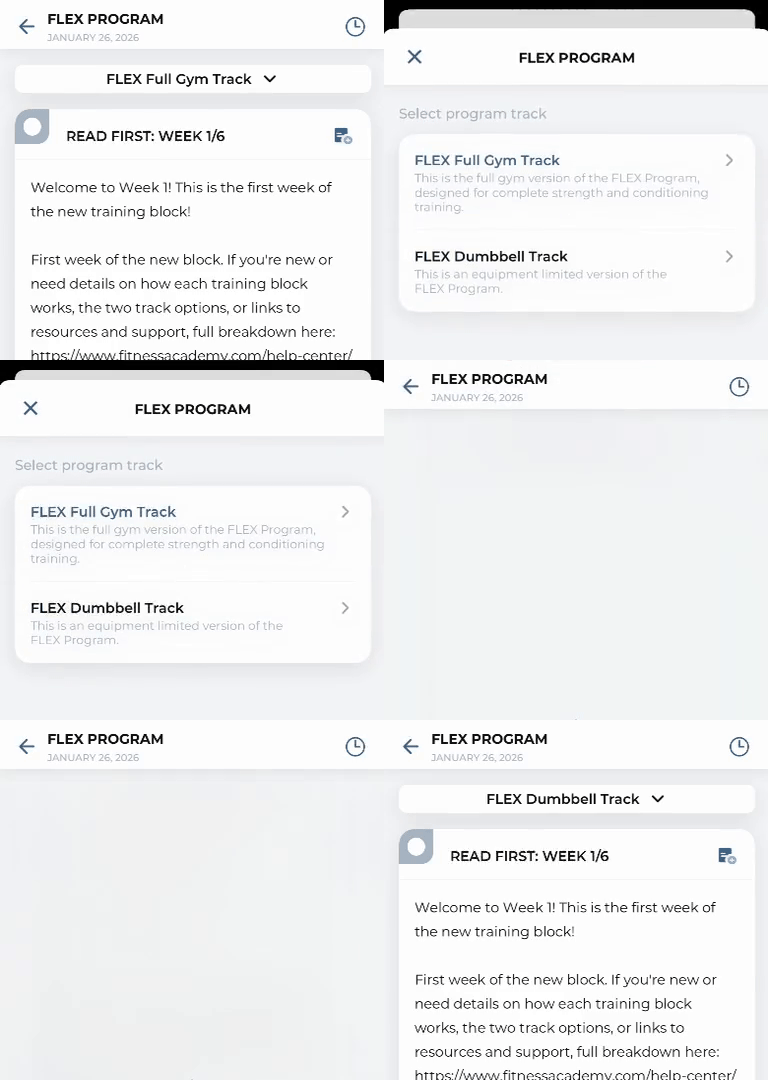
Sign in with the same email you used at checkout. Once you’re in, pick your track:
- FLEX Full Gym for barbells, machines, dumbbells, and cardio equipment.
- FLEX Dumbbell for dumbbells only.
You have access to both and can switch anytime. Tap the track selector at the top of your program to switch.
Returning Member
If you cancelled but didn’t delete your account, you can reactivate your subscription through the subscription portal. Access it via the Manage Subscription link in the website menu, or go directly to fitnessacademy.fitr.training. If you deleted your account, sign up again as a new member.
About the Subscription Portal
When you sign up or manage your subscription, you’ll redirect to fitnessacademy.fitr.training. This is our secure subscription portal powered by FITR. This redirect is normal and safe.
Important Notes
- Use the exact same email from your subscription signup
- If you used Apple “Hide My Email” or Gmail aliases, contact support
- You cannot sign up for subscriptions inside the app
- You cannot manage billing inside the app
- Training happens in the app, subscription management happens on the website
On a Legacy (web-only) subscription? See Legacy Subscription.


